Grassroots AI Consulting — AI Packs for Small Business
Grassroots AI Consulting  ·  Simple AI packs for small business
Book a Free Consult
Real Business. Real AI. Real Results.

AI That Fits
Your Workflow,
Not the Other
Way Around

Grassroots AI Consulting helps small businesses grow with simple, practical AI packs — no complex software, no tech background needed. Below is a live example of what one pack delivered for a real local gym.

Case study — Website Redesign Pack
Client
Lactic Fitness, Modbury North SA
Platform
Squarespace
Pack used
Website Redesign AI Pack
Output
5 pages rebuilt · 9 AI prompts
Drag the sliders below to compare the real before and after — every change was made using AI prompts from the pack.
01
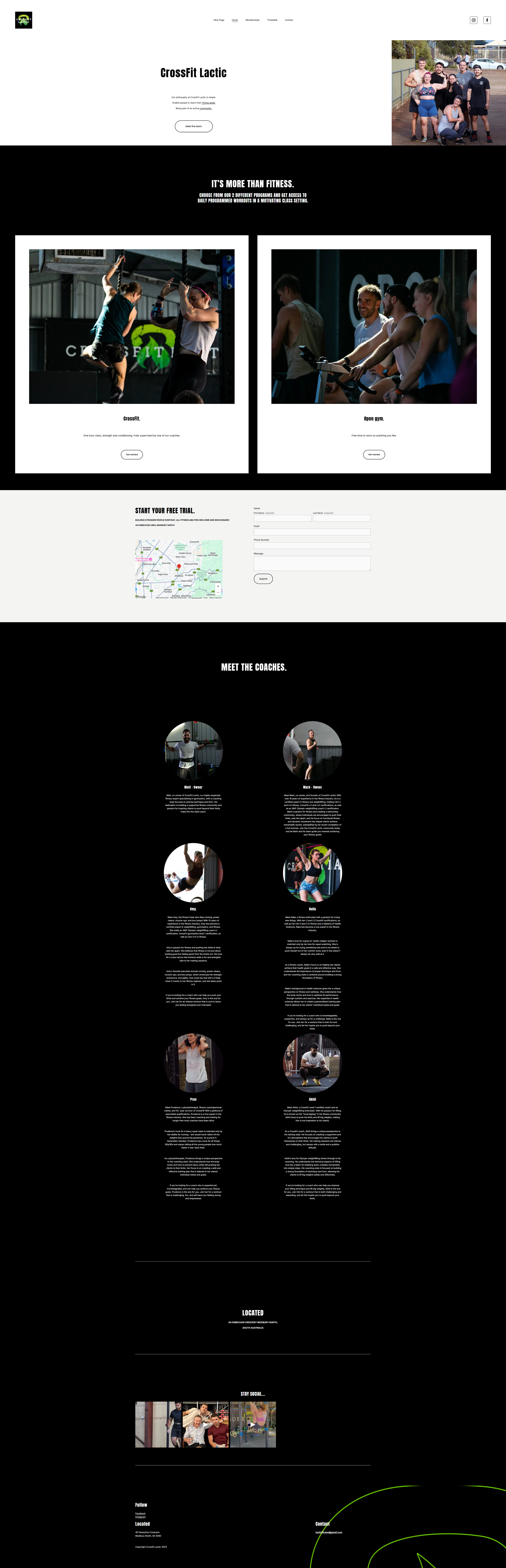
Homepage — The First Impression
The Hero That Didn't Convert

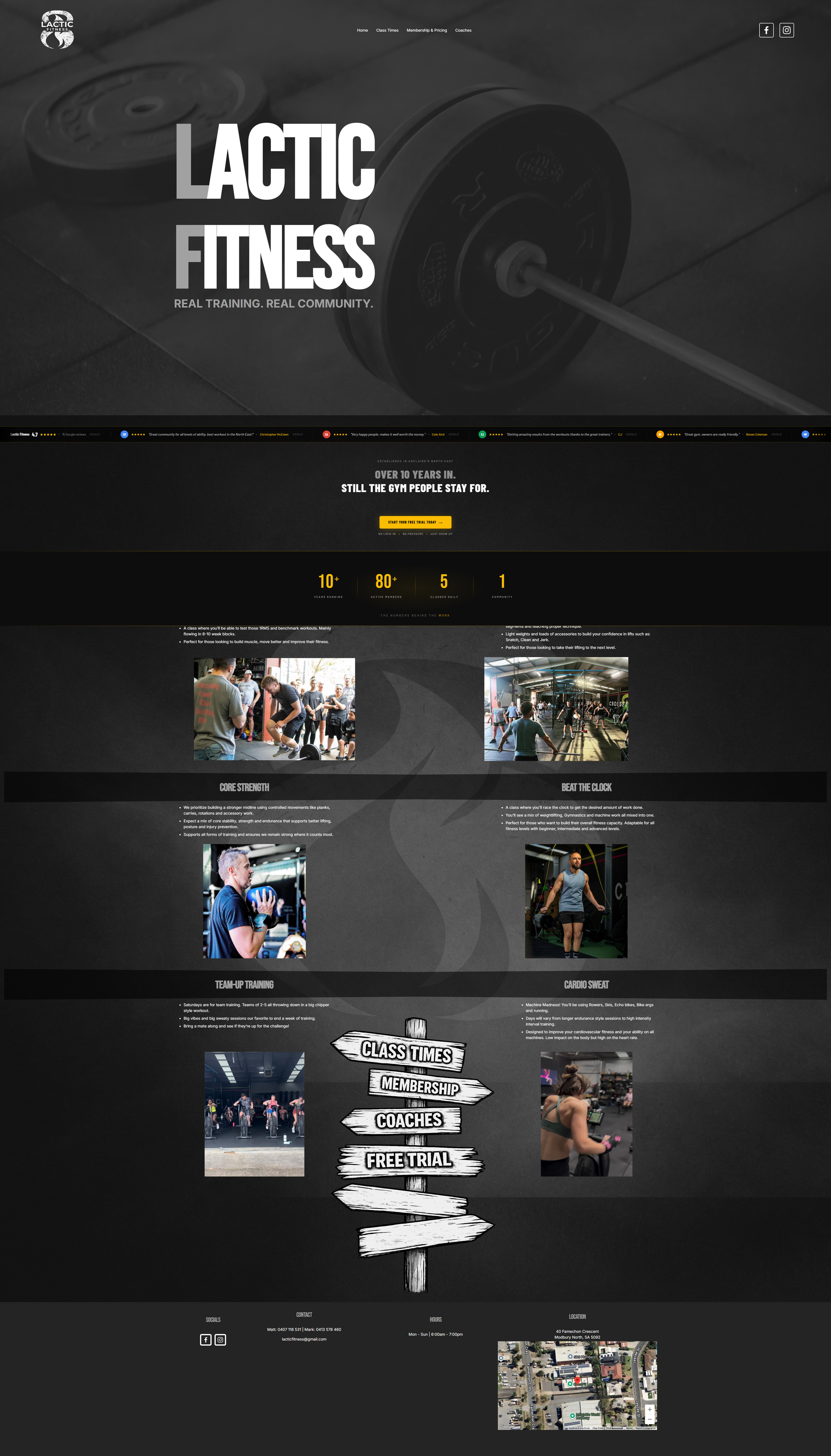
A real gym with real coaches and a real community — but a homepage that sent every new visitor to an email app instead of a booking page.

Local Gym · Before · Home
Before screenshot
Local Gym · After · Home
After screenshot
Before
After
👆 Drag to compare before and after
What the pack fixed on this page
🔗
Problem → Fix
CTA buttons linked to an email app
"Get started" opened the visitor's email client. The pack replaced this with a dedicated Intro Tour booking page linked from every button on the site.
Prompt 2 — Homepage Headline & CTA Buttons
Problem → Fix
Zero social proof above the fold
No reviews, no ratings, no trust signals anywhere. The pack added a live Google reviews widget showing 4.7 stars from 15 real members — immediately visible on load.
Prompt 3 — Google Review Cards
🏷️
Problem → Fix
Two vague programs, six clear classes
"CrossFit" and "Open gym" told a new visitor nothing. The pack created 6 named class types — each with a photo, 3 bullet points, and a "who this suits" line.
Prompt 4 — Class & Service Descriptions
02
Membership & Pricing — The Decision Page
Pricing That Justifies the Cost

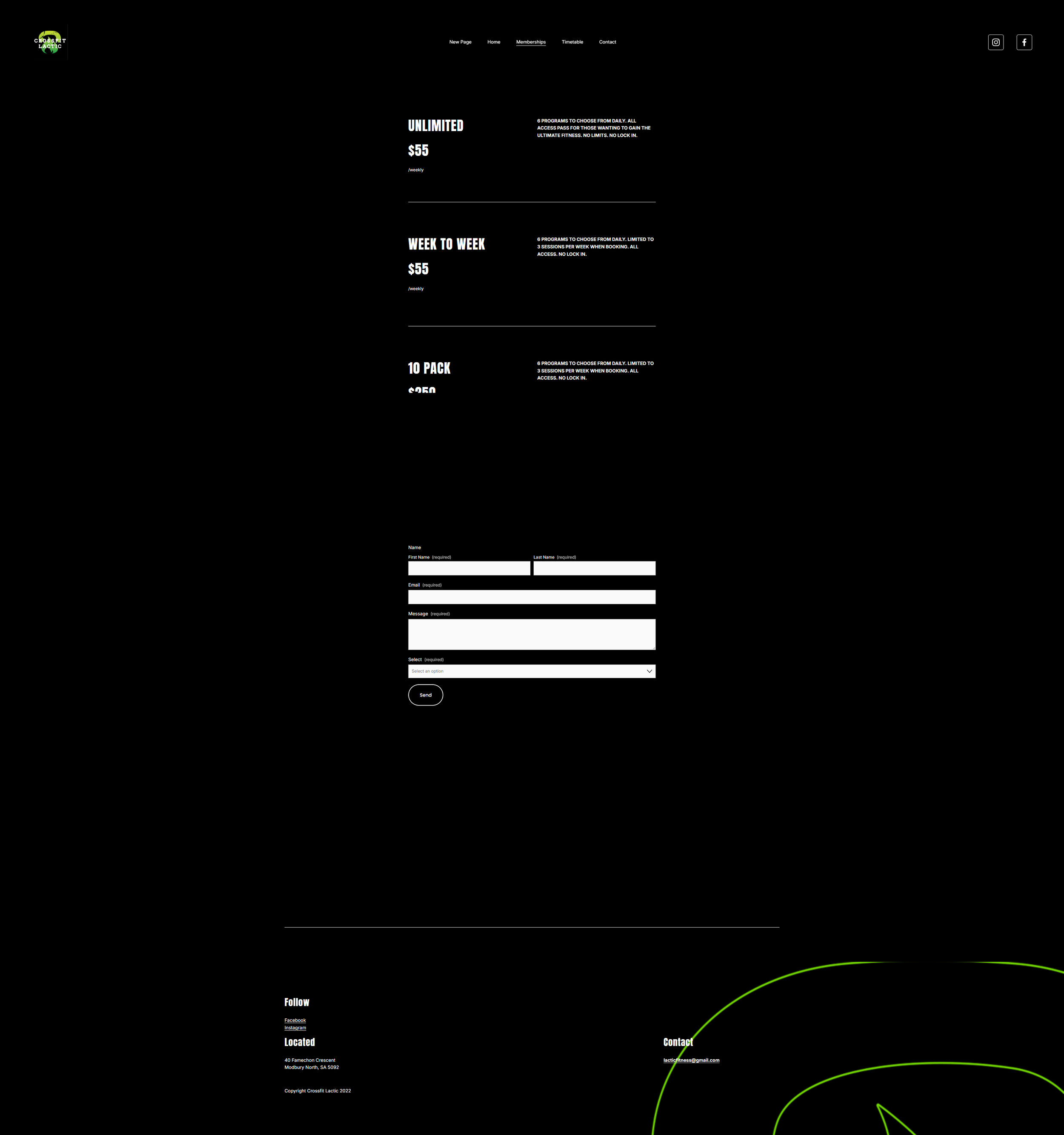
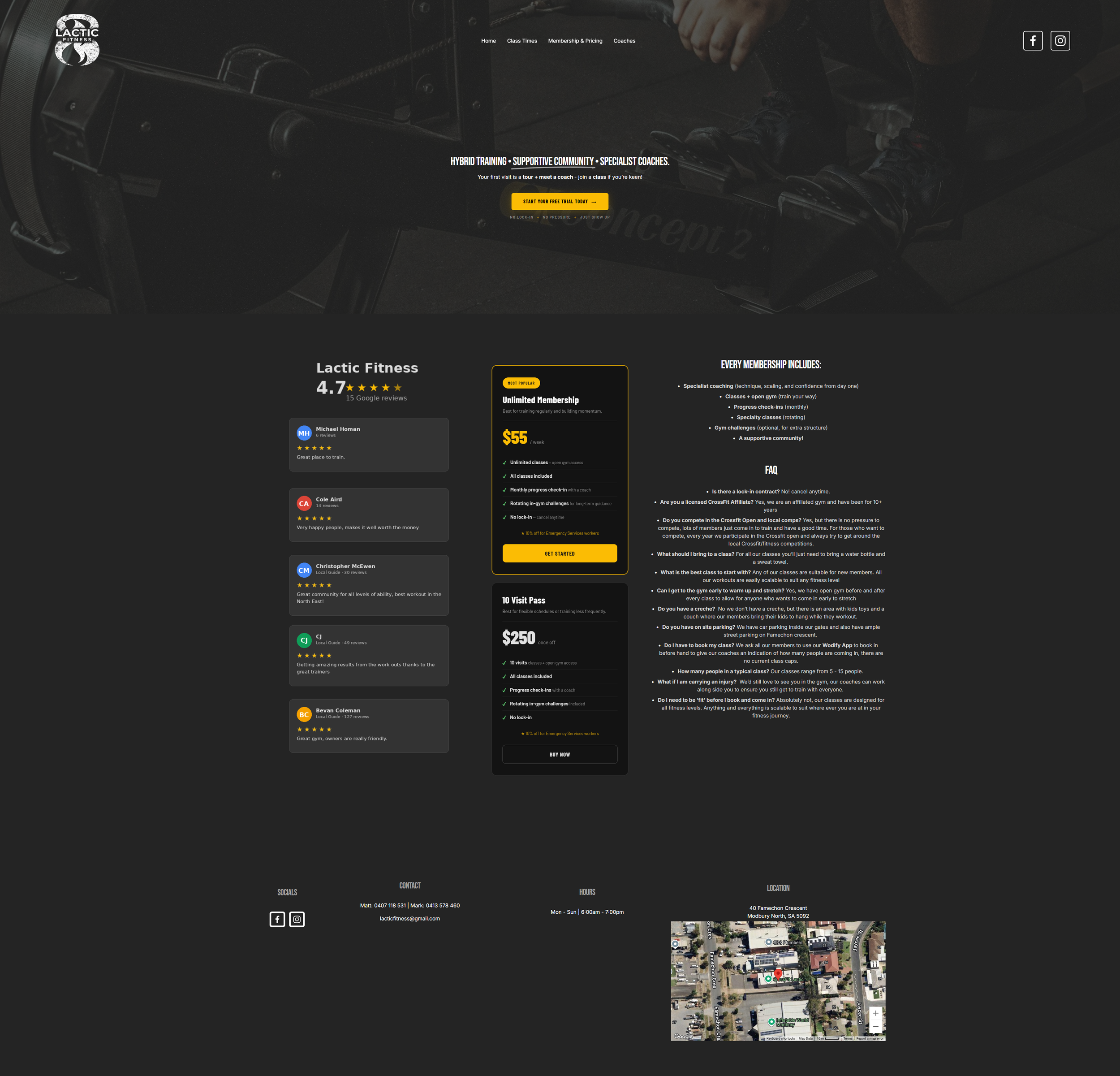
A membership page existed, but pricing was buried and benefits weren't explained. New visitors had no way to understand what they were signing up for.

Local Gym — Before · Memberships
Before screenshot
Local Gym · After · Membership & Pricing
After screenshot
Before
After
👆 Drag to compare before and after
What the pack fixed on this page
💳
Problem → Fix
Pricing was vague and buried
No clear prices visible, "contact to join" as the only CTA. The pack built two clear pricing cards — $55/week Unlimited and $250 10-Visit Pass — each with benefit bullets and a "who this suits" line.
Prompt 7 — Pricing Cards & FAQ
Problem → Fix
No FAQ for nervous new members
A nervous first-timer had no answers on the page. The pack generated 13 FAQ answers covering lock-in contracts, injuries, fitness level required, parking, kids, and booking — all in plain English.
Prompt 7 — Pricing Cards & FAQ
🎯
Problem → Fix
No CTA connecting to a booking path
The old page ended without a next step. Every pricing card now links to the Intro Tour booking page, with the same CTA wording used consistently across the entire site.
Prompt 6 — First-Visit Booking Page
03
Class Times — The Schedule Page
A Schedule You Can Actually Book

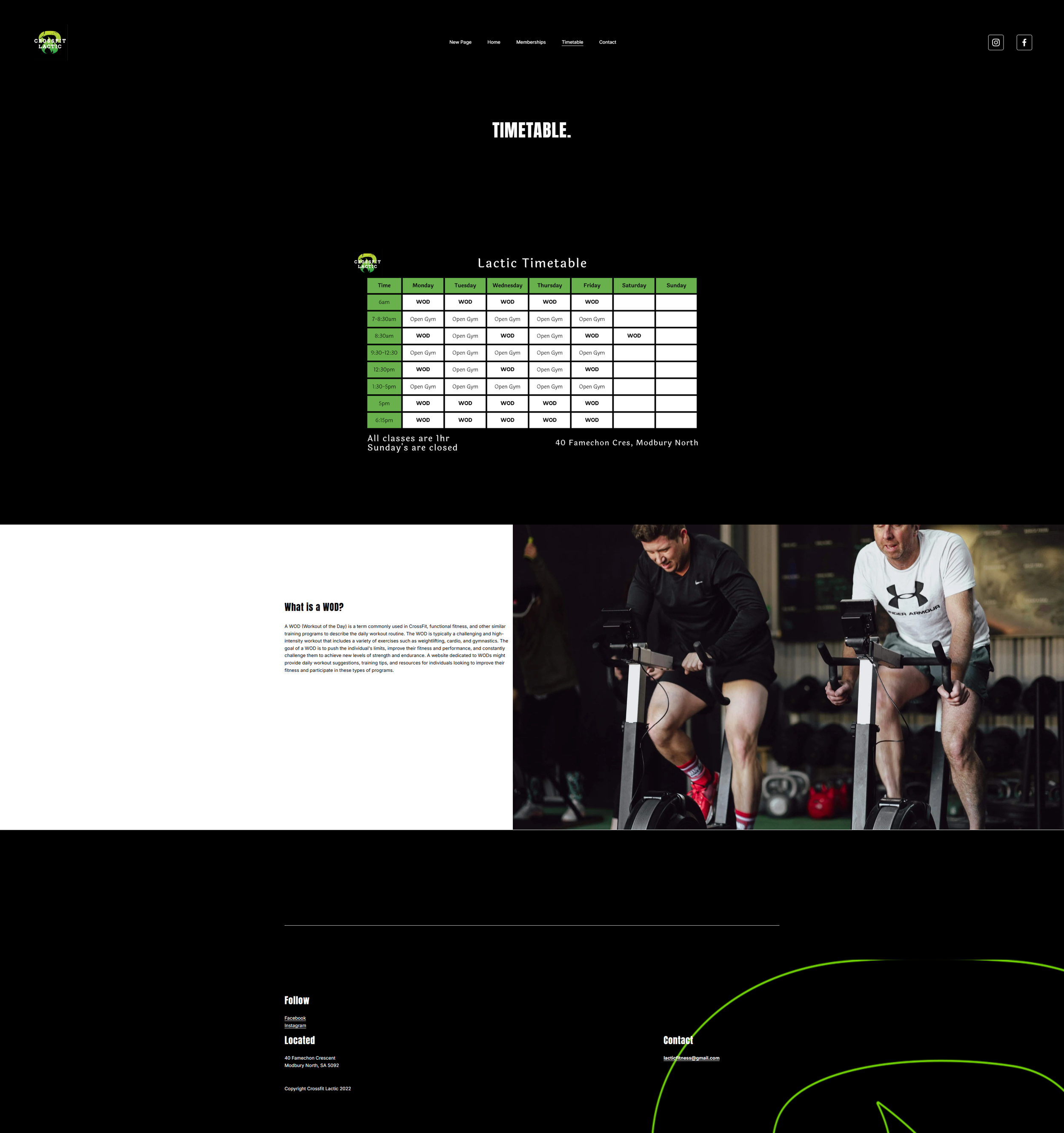
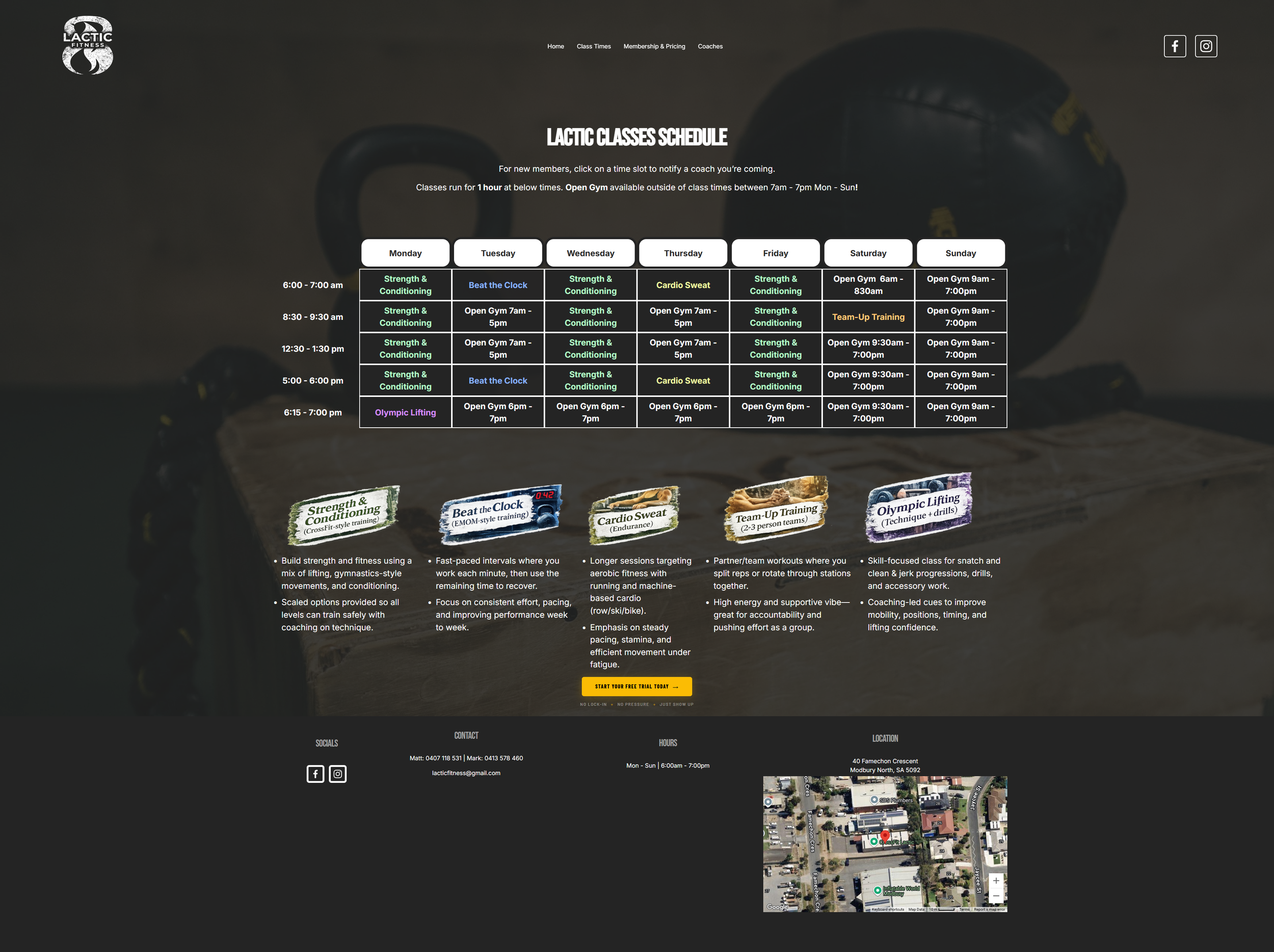
The old timetable was a static image — not clickable, not searchable, impossible to update. The new one turns every time slot into a booking link.

Local Gym · Before · Timetable
Before screenshot
Local Gym · After · Class Times
After screenshot
Before
After
👆 Drag to compare before and after
What the pack fixed on this page
📋
Problem → Fix
Static table, not real website text
The timetable was a grid with no context — not searchable, not updatable without a redesign. The pack rebuilt it as day-by-day structured text, easy to edit and readable on any screen.
Prompt 5 — Class Timetable Page
📅
Problem → Fix
No class names, just "CrossFit"
Every slot said the same thing. The rebuild introduced 5 named class types — Strength & Conditioning, Olympic Lifting, Beat the Clock, Cardio Sweat, and Team-Up — each colour-coded and described.
Prompt 4 — Class & Service Descriptions
👆
Problem → Fix
No booking path from the schedule
A new member checking times had no next step. Every class slot now links directly to the Intro Visit booking page — one tap from schedule to booked.
Prompt 6 — First-Visit Booking Page
Want this for your business?
Start with a Free Consult. No lock-in. Plain English.
Book a Free Consult
The Website Redesign AI Pack
Nine Prompts.
One Complete Website.

Every step in the pack is built around a real problem from a real website. Each prompt produces output you can paste directly into Squarespace.

1
Page Menu
Tidy your page menu so new visitors know where to go
We remove any leftover or unnamed pages and give each page a clear, simple title. The old site had a page called "New Page" sitting in the menu — visible to every visitor who landed on the site.
2
Homepage Opening
Write the opening headline, tagline, and main action buttons
We use AI to write your main heading, the short line beneath it, and the wording on your action buttons — all tailored to your suburb, your business name, and what you want people to do first.
3
Customer Reviews
Turn your Google reviews into quote cards on your homepage
You paste your existing Google reviews in. We use AI to format each one into a tidy quote card showing the star rating and the reviewer's name — ready to place straight onto your homepage.
4
Classes and Services
Write a clear description for every class or service you offer
You give us your list of classes or services. We use AI to write a short description for each one — what it involves, what to expect, and who it is best suited for — all in plain language.
5
Weekly Timetable
Turn your weekly schedule into a clear, easy-to-read page
You share your timetable in whatever format you have it — a photo, a spreadsheet, or just typed out. We use AI to turn it into a day-by-day schedule page with a short intro and a clear next step for new visitors.
6
First Visit Page
Build a welcoming page for people who want to visit for the first time
We use AI to write the heading, the short welcome paragraph, and the reassuring wording that helps a first-time visitor feel comfortable enough to fill in the enquiry form and book their visit.
7
Pricing and Questions
Write your pricing options and answer the questions new customers always ask
We use AI to write a clear card for each pricing option — what is included and who it suits — then generate answers to the ten most common questions a new customer would have before committing, all in plain, friendly language.
8
Team Profiles
Rewrite your team profiles into short, consistent website summaries
You share your existing team write-ups — however long or rough they are. We use AI to rewrite each one into a short, consistent profile showing their name, their role, what they are known for, and their qualifications.
9
Phone Check
Check every page reads clearly on a phone before you publish
Most visitors will see your website on their phone first. We use AI to review every page and flag anything that is too long, too small, or hard to read on a small screen — then suggest clearer versions of anything that needs tidying up.

This Could Be
Your Business.

We start with a free consult to understand your business, what's working, and what's getting in the way. No tech knowledge needed — we do the heavy lifting and deliver everything in plain language.

No lock-in  ·  No tech knowledge needed  ·  Plain English, start to finish